
Enable Instagram DM Access for Enrollio
To send and receive Instagram Direct Messages in Enrollio, you need to enable messaging access in your Instagram account settings. This allows Enrollio to communicate with prospective families who reach out via Instagram.
Enable Instagram DM Access
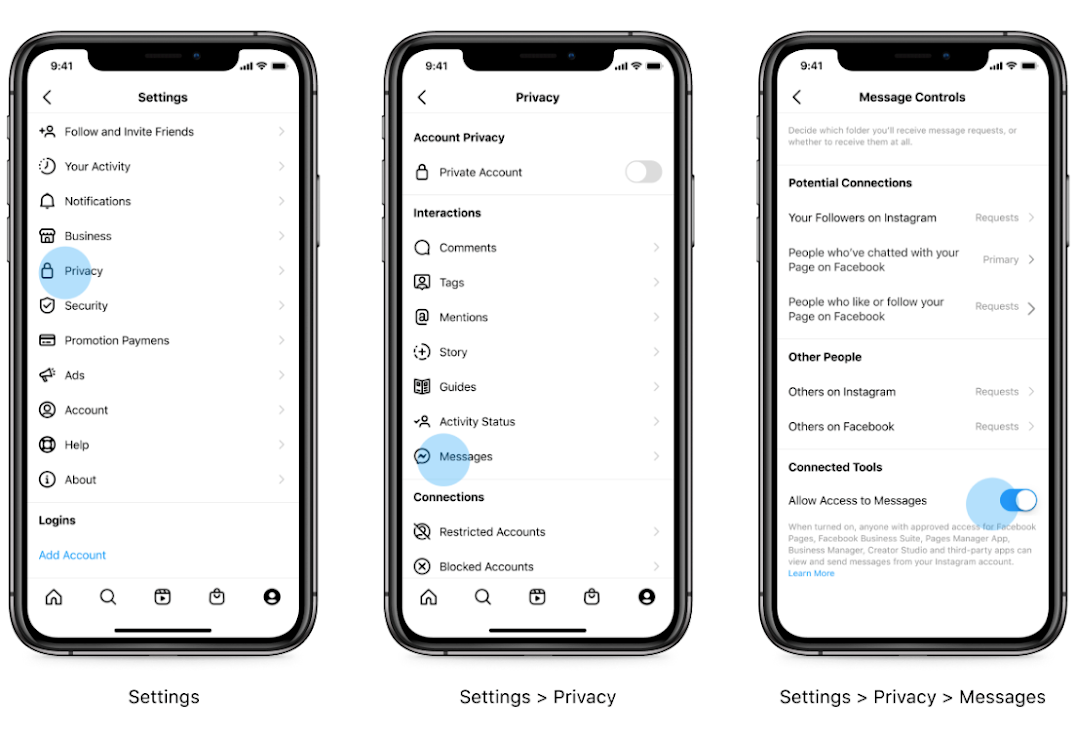
Follow these steps in the Instagram mobile app:
- Open Instagram and go to your business or creator profile
- Tap the menu icon (three horizontal lines)
- Select Settings
- Select Privacy
- Select Messages
- Under Connected Tools, toggle on "Allow Access to Messages"
What This Does
When you enable this setting, anyone with approved access to your Facebook Business Suite or connected apps (like Enrollio) can view and respond to Instagram Direct Messages on your behalf.
If you toggle this off, you'll only be able to view Instagram DMs directly in the Instagram app — they won't appear in Enrollio.
Next Steps
Once you've enabled Instagram messaging access, return to Enrollio and complete your Instagram connection in Settings Integrations Instagram.
You'll then be able to:
- Receive Instagram DMs from prospective families in your Enrollio inbox
- Respond to Instagram messages directly from Enrollio
- Set up automations to respond to common Instagram inquiries
- Track all parent conversations in one place
Need help? Check out our guide on Connecting Your Instagram Account to Enrollio.
Comments
Please sign in to leave a comment.