
What's New
Enrollio's Forms & Surveys now support advanced math calculations, making it easy to create interactive forms that automatically score responses. This is perfect for parent readiness questionnaires, program fit assessments, or fee calculators—no complex setup required.
Support for More Field Types
You can now assign custom numeric scores to these field types:
- Radio Select
- Checkbox
- Single Dropdown
- Multi Dropdown
Each option within these fields can have its own unique score value.
Expanded Calculation Logic
Combine these scored fields with Number and Monetary fields to create sophisticated scoring systems. Build parent assessments, program fee calculators, or family preference quizzes that adapt to responses.
Real-Time Score Preview
As you build your form, switch to Preview Mode to see calculations update instantly. Test your scoring logic before sharing forms with families.
How to Set Up Math Calculations
Step 1: Add Supported Fields
Open your form or survey in the builder. Use the Quick Add menu to drag in any of these fields:
- Radio Select
- Checkbox
- Single Dropdown
- Multi Dropdown
Step 2: Assign Scores to Options
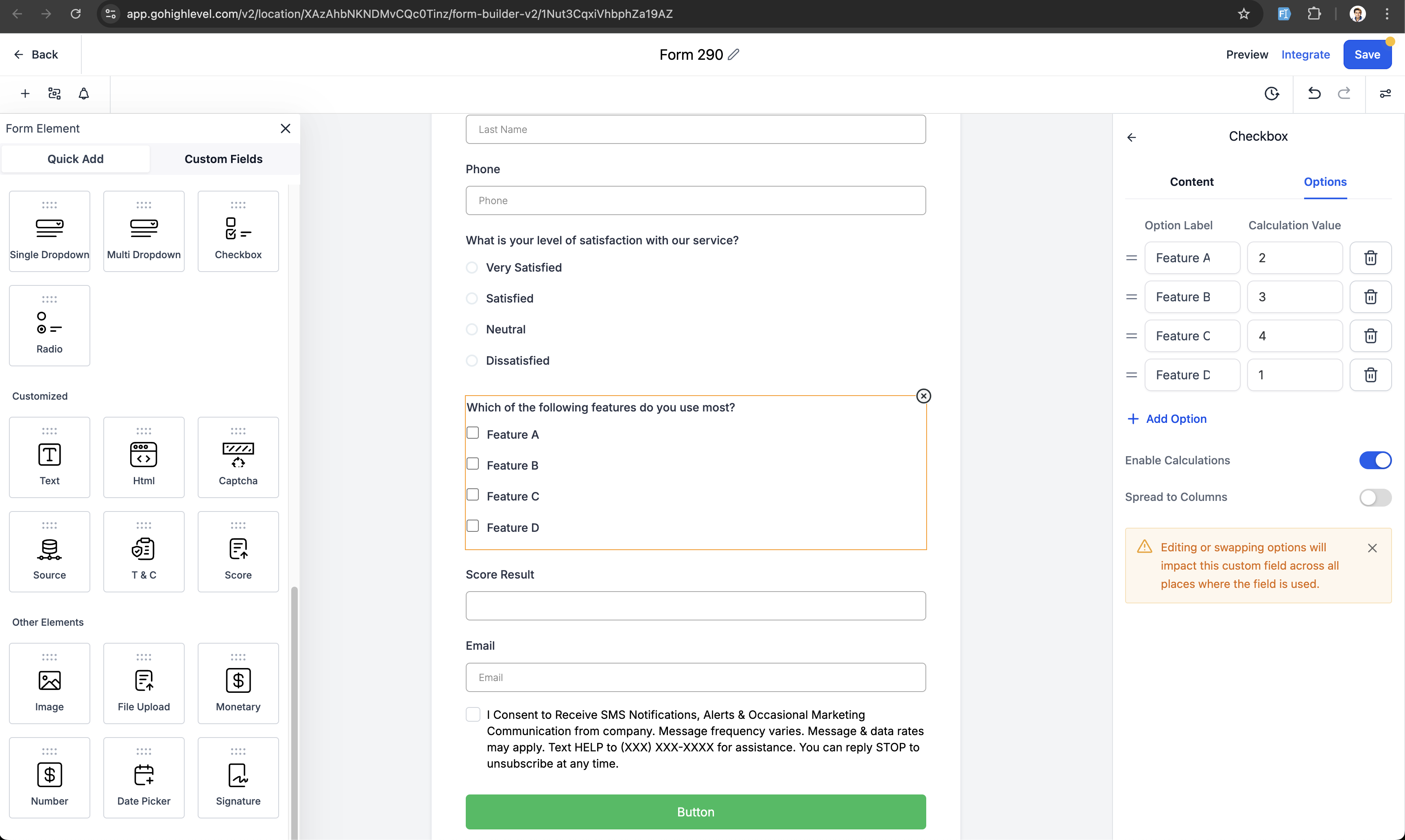
Click into each field and assign a numeric score to each answer option. These scores will be used in your calculations.
Step 3: Configure Your Calculation
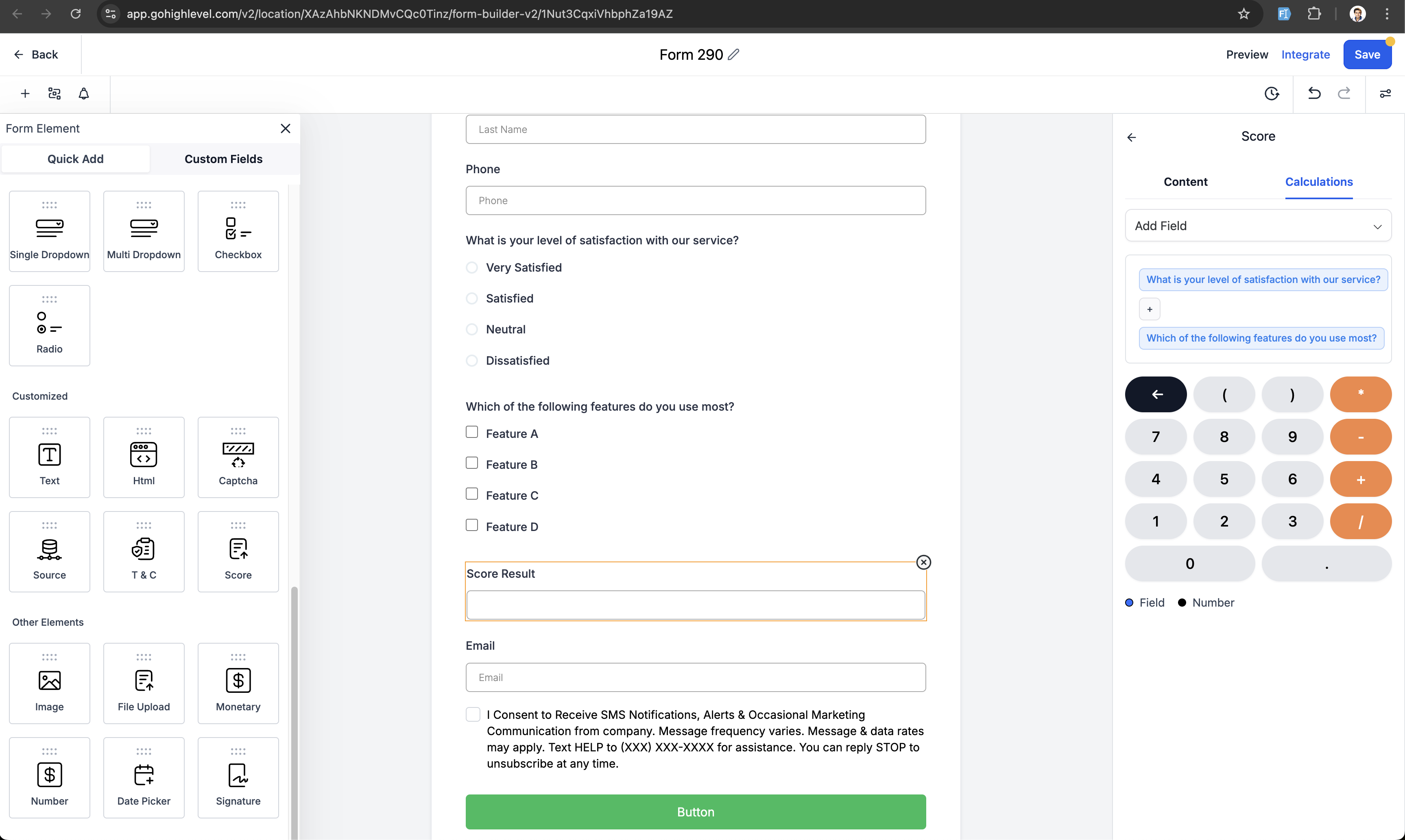
Use the calculation settings in the form builder to define how scores are combined. Set up totals, averages, or custom formulas based on your needs.
Step 4: Test in Preview Mode
Switch to Preview Mode and test your form. Select different options and watch the score update in real time.
Example Use Cases for Childcare Centers
Program Readiness Assessment
Create a questionnaire for parents to assess if their child is ready for a specific program. Score responses to recommend the best fit.
Fee Calculator
Let families select add-on services (extended care, meals, activities) and see their total monthly tuition automatically calculated.
Family Priority Scoring
Score intake forms to identify families who are the best fit for your program. Use higher scores to prioritize follow-up.
Parent Preference Survey
Gather feedback on program features families value most. Assign point values to help you identify trends and make data-driven decisions.
Frequently Asked Questions
Can I use decimal or negative scores?
Yes. You can assign both decimal values (like 2.5) and negative values (like -1) to any option for more flexible scoring.
Do calculations show on live forms or just in preview?
Calculations appear in Preview Mode while you're building. For live forms, configure where scores display—like on confirmation pages, in hidden fields, or passed to custom fields for automations.
Can I trigger automations based on the calculated score?
The form builder calculates scores, but you'll need to use automations to trigger actions based on score values. For example, send different follow-up emails to families based on their assessment results.
Will this affect my existing forms?
No. Your existing forms will continue working exactly as they do now. You'll need to manually update forms to take advantage of these new calculation features.
Does this work in surveys too?
Yes. This update applies to both Forms and Surveys in Enrollio.
Comments
Please sign in to leave a comment.