
Missed Call WhatsApp Follow-Up automatically sends a WhatsApp message to parents when their call goes unanswered. This helps your team reconnect faster—without building complex automations.
Enable it in your Phone System settings and customize a friendly follow-up message that can include your center's name or tour booking link. Ideal for locations where parents prefer WhatsApp over text messaging.
What is Missed Call WhatsApp Follow-Up?
Missed Call WhatsApp Follow-Up is a Phone System feature in Enrollio that sends a WhatsApp message to a parent or prospective family after a call is marked as "missed." It closes the communication gap so families get a quick acknowledgment and clear next step, improving enrollment conversions and parent satisfaction.
Key Benefits
Instant Engagement: Parents receive a timely WhatsApp message right after a missed call.
No Automations Required: Quick to set up and active within minutes—no complex automations needed.
Higher Response Rates: WhatsApp often sees stronger open and reply rates compared to SMS.
Brand Consistency: Customize wording to match your center's voice and include helpful links like tour scheduling.
Personalization: Insert dynamic details like your center's name or booking link.
Less Manual Follow-Up: Fewer callbacks slip through the cracks; parents know exactly what to do next.
Before You Start
Make sure you have:
- A WhatsApp-enabled phone number connected to your Enrollio account (WhatsApp must be active and in good standing)
- Permission to access Settings → Phone System
- Confirmation that parents can receive WhatsApp messages
- Appropriate consent to message families on WhatsApp
If a parent's number isn't on WhatsApp, the message won't deliver via this channel.
How to Set Up Missed Call WhatsApp Follow-Up
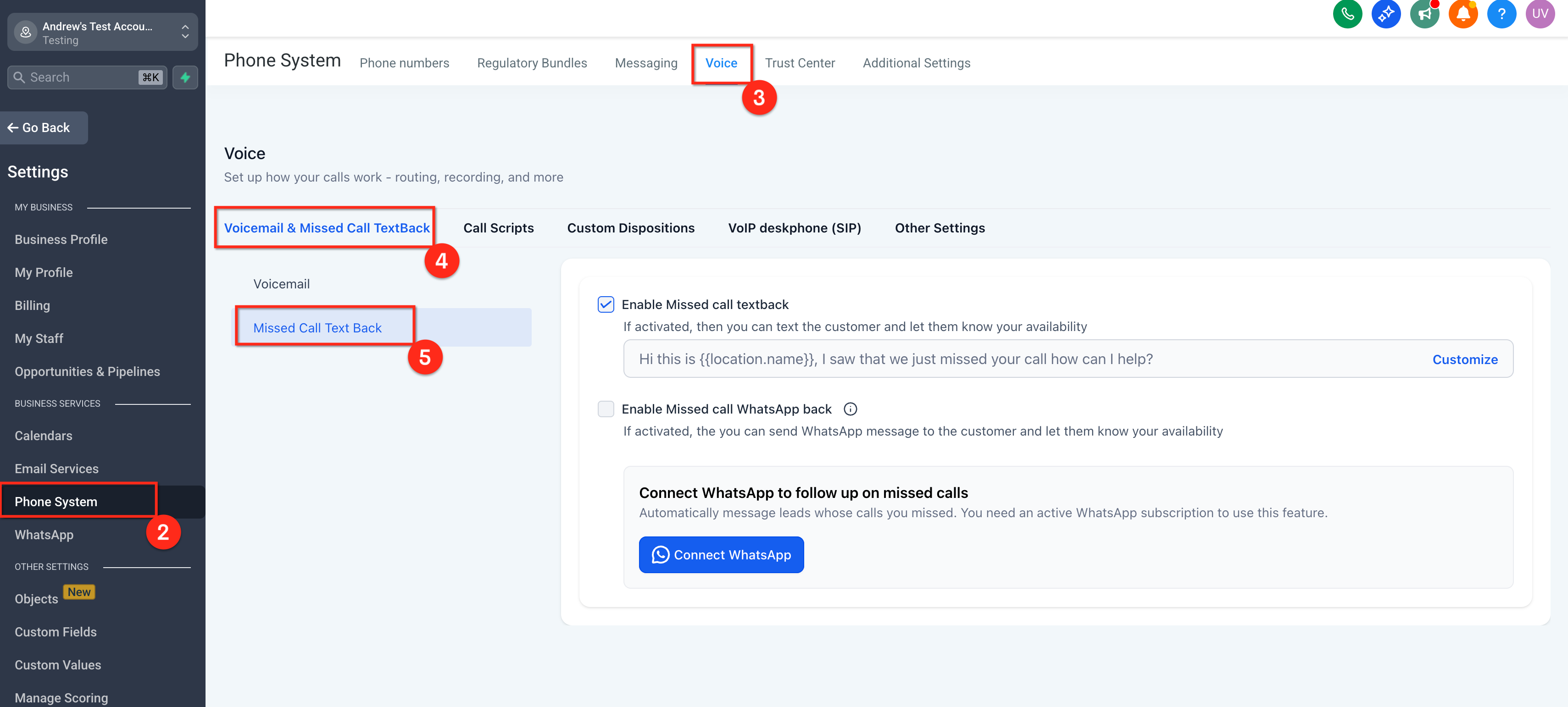
- Go to Settings → Phone System → Voice → Voicemail & Missed Call TextBack
- Scroll to Missed Call Textback
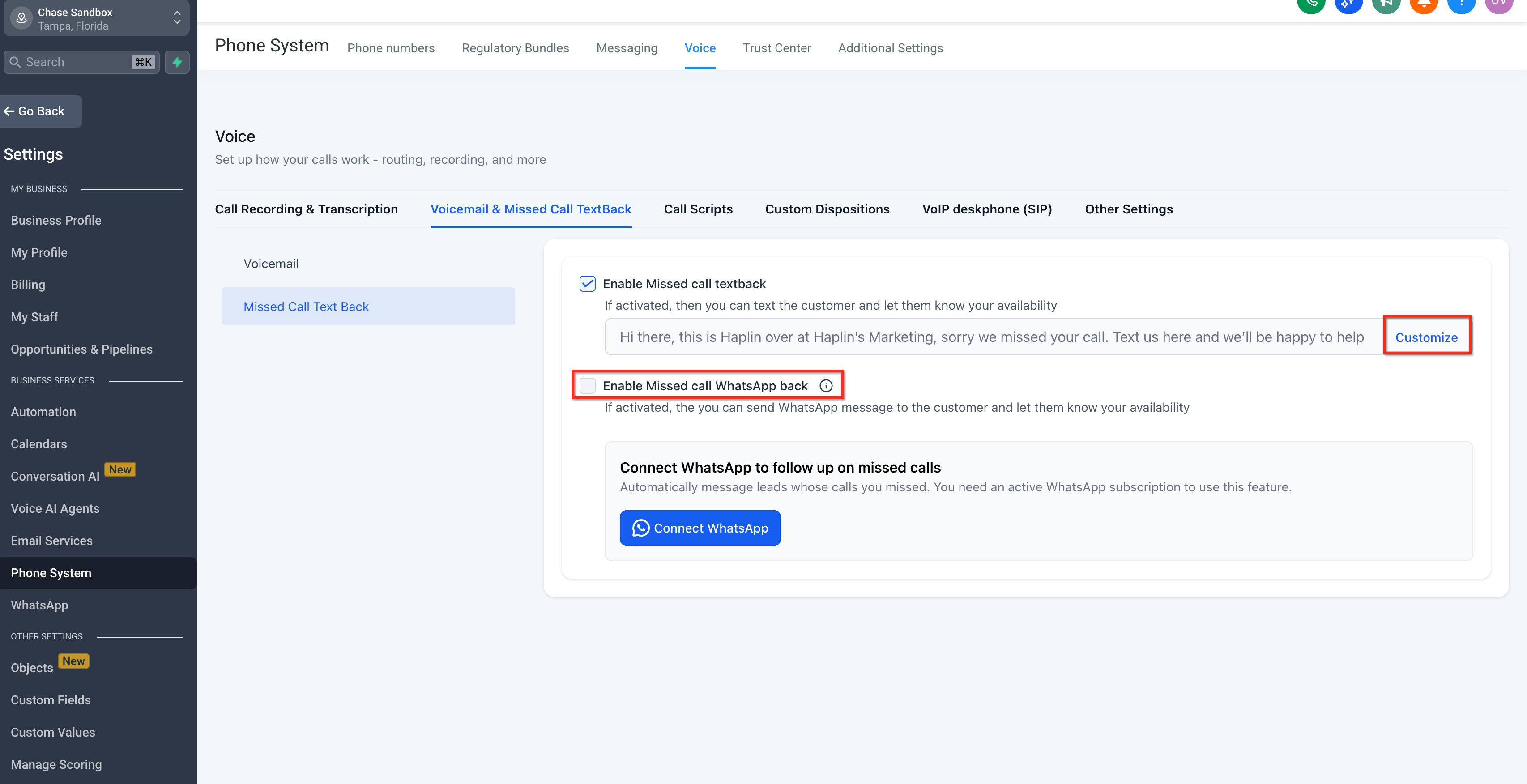
- Toggle Missed Call WhatsApp Back to On
- Click Customize to edit the message
- Review the prefilled text and adjust it to match your center's tone
- Insert variables as needed (see next section)
- Click Save
- Place a test call to confirm the WhatsApp message sends correctly
Default Message & Personalization
Enrollio starts you with a helpful default message:
"Hi this is {{location.name}}, I saw that we just missed your call. How can I help?"
You can edit this message directly in the Missed Call Textback settings (not in WhatsApp Templates).
Available Variables
- {location_name} or {{location.name}} – Your center's name
- {booking_link} – Tour scheduling link you've configured
- {agent_name} – Assigned team member's name (when available)
- {business_hours} – Your center's open hours
Pro tip: Keep messages warm and helpful. Something like "We'd love to show you around! Book a tour here: {booking_link}" works great for prospective families.
Troubleshooting
No message sent:
- Confirm WhatsApp is connected to your phone number
- Verify the toggle is enabled in Phone System settings
Variables show as {location_name} instead of your center's name:
- Check your variable syntax matches exactly
- Ensure values exist in your settings (e.g., booking link is configured)
Parents receiving duplicate messages:
- Check if you have both SMS Textback and WhatsApp enabled
- Look for overlapping automations triggered by missed calls
Parent didn't receive the message:
- Confirm they use WhatsApp and haven't opted out
- Verify phone number includes country code and is formatted correctly
Concerned about after-hours messaging:
- Messages send whenever a call is marked missed, including after hours
- Add {business_hours} to your message to set expectations
- Or adjust call routing schedules to control when calls can be "missed"
Frequently Asked Questions
Can I use WhatsApp Follow-Up without SMS Textback?
Yes. You can enable WhatsApp on its own or alongside SMS. Just pick one as your primary channel to avoid sending duplicate messages.
Where do I edit the message?
Inside Settings → Phone System → Voice → Missed Call Textback. Don't edit this in WhatsApp Templates—that's for different message types.
Does it send during off hours?
Yes, whenever a call is marked missed. Include {business_hours} in your message so parents know when to expect a call back, or adjust your call routing if you want different behavior.
What if the parent isn't on WhatsApp?
The message won't deliver. Consider enabling SMS Missed Call Textback as a backup, or create an automation to handle those cases.
Related Articles
- Missed Call Text Back (SMS) — Overview & Setup
- WhatsApp Setup for Your Enrollio Account
- Phone System Settings Overview
- Creating Tour Booking Links
Comments
Please sign in to leave a comment.