
Local Presence Dialing: Increase Answer Rates with Regional Caller IDs
Boost your call answer rates by presenting a local phone number to parents based on their region. Local Presence Dialing automatically chooses the outbound caller ID that matches or is closest to the recipient's area code, helping parents feel more comfortable answering your calls.
This feature is especially valuable for childcare centers operating across multiple U.S. and Canadian regions, increasing engagement and reducing missed connections with prospective families.
What is Local Presence Dialing?
Local Presence Dialing automatically selects the best outbound phone number based on a parent's area code. By using region-specific numbers you've purchased and verified, your calls appear local to recipients, significantly improving pick-up rates and building trust.
Key Points to Remember
- Supports all area codes in a region: If you're calling a parent with area code 241 in Dallas:
- If you have a phone number with area code 241, that number will be used
- If you don't have 241 but have another Dallas number (like 972), the 972 number will be used
- If you don't have any Dallas-area numbers, your client account's default phone number will be used
- Default fallback: Your client account's default phone number is used when no regional numbers match
- USA/Canada only: Currently supports United States and Canadian phone numbers
Key Benefits of Local Presence Dialing
Local Presence Dialing offers several advantages that help you connect better with families:
- Higher Answer Rates: Local caller IDs feel familiar, encouraging parents to answer unknown numbers
- Improved Trust: Consistent local presence builds credibility and reduces spam perception
- Automated Selection: No manual switching required—calls automatically use the matching or regional number
- Regional Fallback Support: If an exact area code match isn't available, another number from the same region will be used
- Flexibility: Can be enabled or disabled at the client account level, giving you control
How Local Presence Dialing Works
Understanding how the feature selects caller IDs helps you maximize its benefits when calling families.
When you initiate an outbound call, Enrollio checks the parent's phone number area code against your available numbers:
- If an exact area code match exists, the call uses that number as the caller ID
- If no exact match exists, Enrollio attempts to use a number from the same geographic region (e.g., a different Dallas area code)
- If no regional match is available, your client account's default caller ID will be used
Number selection happens in real time without any intervention needed from you.
How to Set Up Local Presence Dialing
Setting up Local Presence Dialing ensures your outbound calls automatically use regional numbers for maximum impact.
- Go to Client Account Settings
- Click Phone Numbers
- Navigate to Advanced Settings Voice Calls Outbound Call
- Find Default Phone Number for Outbound Calls
- Toggle Enable Local Presence Dialing to On
Example Use Cases
Here's how Local Presence Dialing increases answer rates by automatically calling from the same area code:
Example 1: Calling a Family in Dallas, Texas
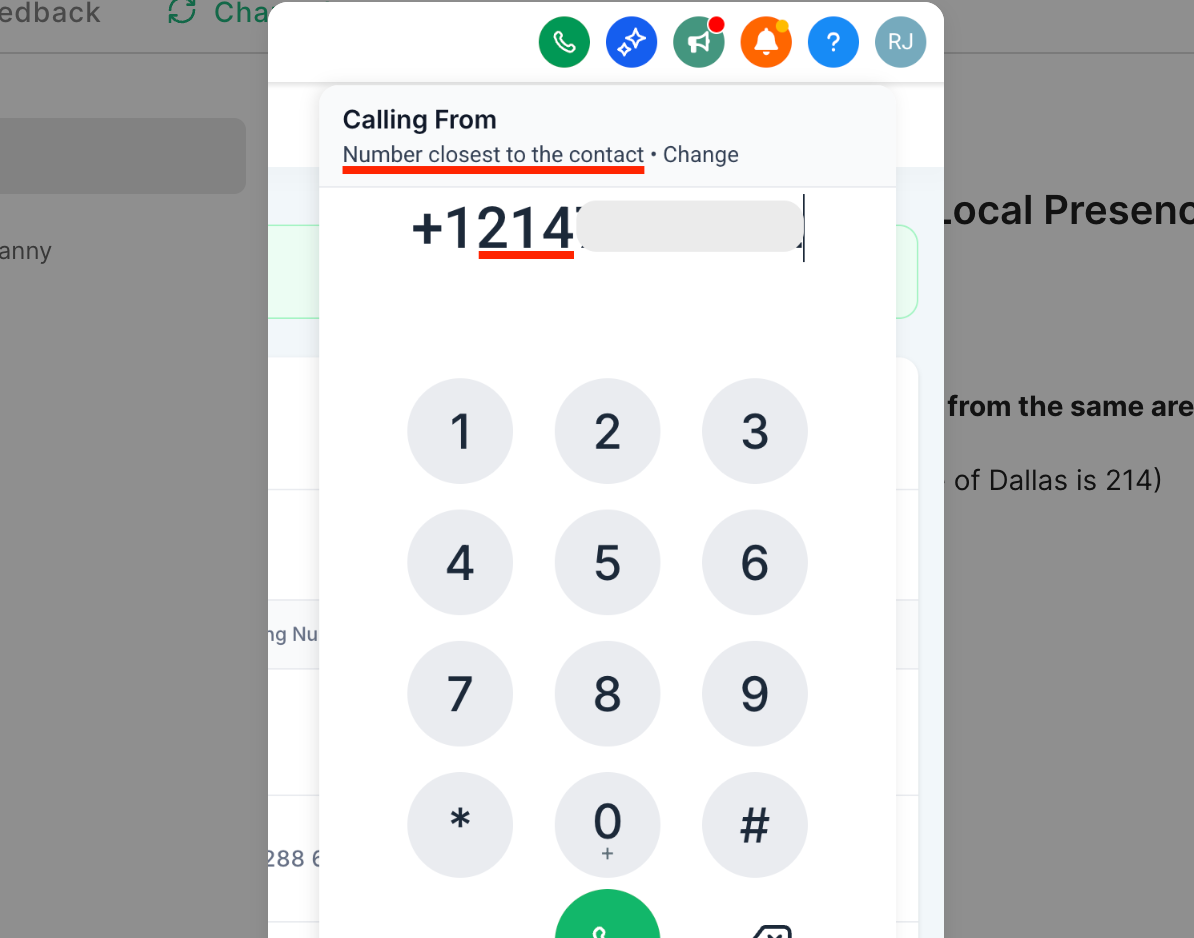
When calling someone in Dallas (area code 214), Enrollio automatically uses a Dallas number if you have one available. The parent sees a familiar local number, increasing the likelihood they'll answer.
Example 2: Calling a Toll-Free Number
When calling someone with area code 888, Enrollio automatically uses your phone number with the same area code. This increases trust and improves your chances of connecting with the family.
Frequently Asked Questions
What happens if a parent's area code doesn't match any of my purchased numbers?
Enrollio falls back to your client account's default business caller ID.
Can I override the auto-selection for specific calls?
Yes. Before making a call, click Change on the top bar of the dialer and choose from your phone numbers. After your call, Enrollio switches back to Local Presence Dialing. You can disable Local Presence Dialing if you want to retain your choice of calling number.
Are there limits on how many numbers I can add?
Enrollio supports all phone numbers and Verified Caller IDs in your client account. There are no separate limits.
Does it support Verified Caller IDs?
Yes. The area code of your Verified Caller ID is taken into account when deciding which Caller ID to use for the call.
Does this work if I'm using my own Twilio account?
Yes, Local Presence Dialing works with your own Twilio account.
Can I disable Local Presence Dialing for specific client accounts or users?
Local Presence Dialing can be disabled for specific client accounts but not for individual users.
Is this feature available internationally?
Local Presence Dialing is currently supported only in the U.S. and Canada.
Does Local Presence Dialing improve call answer rates automatically?
Presenting a familiar local number increases the likelihood that parents will answer, but results may vary. Many childcare centers see improved answer rates when using local numbers.
Related Articles
- Remediate 'Spam Likely' on Your Caller ID
- Why Are My Calls Marked as Spam and How Can I Avoid It?
- Overview of Phone Number Configuration Options
- Best Practices for Maintaining a Positive Caller Reputation
- How to Set Up Verified Caller ID
Comments
Please sign in to leave a comment.